Monday, 27 January 2020

貓。筆記


乾乾:
一天的乾乾份量約2-3匙,每天餵的話,放剛好 (3匙) 的量即可;放太多的時候她們反而會不太敢吃。

廚房的架子上有罐罐、備用的lactuose、備用的鮮食化毛膏以及麥牙糖化毛膏:


罐罐:
兩個碗,大致上份量一樣多就好。

大約再加等量的水之後用塑膠湯匙拌一拌。

各自吃罐罐的位置是固定的。

空罐在後陽台有回收的位置。

餵罐罐會有需要收拾和洗餐具的問題,不用有一定要每幾天餵一次的壓力。lactulose 也可加在罐罐裡餵。


肉泥+lactulose:
這個放定位之後很快就會被吃完,因此用肉泥餵lactulose是最簡便的。

用乾的小茶匙裝一匙肉泥,備用的肉泥寄到之後量會很足夠,因此多給一點也可以。

Lactulose在水槽的右邊,旁邊的量杯不會用到。 (備用的lactulose在罐罐那區)


 Lactulose用同樣的湯匙倒一小匙。

加1-2小匙的開水。

調勻之後看起來像這樣,非常受歡迎。

我們自己一天餵兩次,基本上一天一次也可以。


麥芽糖化毛膏:
若想加碼點心的話,這個也可以一天給一次。

用透明的湯匙 (這個化毛膏專用) 擠1cm,拿到她嘴巴前面,她會自己吃。


其他廁所事項:
有時小七可能會忘記要上廁所,抱她到外面她的廁所,她可能會想起來開始上,若當天沒發現她的便便的話,可以把她抱到廁所等她上上看。

若到連續三天都沒看到她的便便,可能需要帶她去獸醫那裡看看肚子的狀況。


Tuesday, 31 December 2019

Christmas in Jewel Changi Airport / 聖誕節 in Singapore

這次轉機的時候,旅館就在機場旁邊新開幕的購物中心裡,Jewel Changi Airport。和前一次住在市區相比從容很多,下飛機之後在沿著室內的指標和連通道走就到了。放好隨身行李之後,換成適合新加坡熱帶氣候的輕裝,就出發去逛街和吃東西了。
When I transited in Singapore, I stayed in a hotel just in a new shopping mall next to Changi Airport, Jewel Changi Airport. It was more relax and convenient than last time when I stayed in the city. After I put my luggage and changed my winter clothes into summer ones, I started my shopping and eating in Singapore.


商場中有一棵三層樓高的聖誕樹:
There was a huge Christmas tree:


旅館裡也有毛巾折成的小動物裝飾:
There were also towel animals in the hotel:


在新加坡這個現代的購物中心,好像打開了關閉了一年的購物開關,即使一開始只是Window Shopping也覺得很開心,在商場的各個角落也都有聖誕節的裝飾,在水舞表演的場地也有期間限定的聖誕表演,不過入場的資格是在單一店鋪消費滿50新幣,真的回到很有商業手腕的北半球,為了難得的聖誕節水舞,在購物中心裡找到可以送給大家的禮物 (在阿德雷得回家之前在Rundle mall 上逛了幾次也沒有找到想買的東西),順利地拿到入場卷了。
After one year, my shopping switch was turned on again in Singapore. I only did window shopping at the beginning. Later when I found out there was a special Christmas events at first floor and the ticket was to spend 50 Singapore dollars in one receipt, I started to find souvenir for my friends and easily got the ticket.
(When I was in Adelaide, I went to Rundle mall several times, but I could not find something suitable.)


除了兩個小時一次的聖誕節特殊表演之外,之間還穿插平日的表演,因此入場之後在裡面待長一點的時間就能夠看到兩種水舞表演,也順便讓逛了一個晚上而酸痛的腳休息一下。
Except Christmas events every two hours, there were also ordinary shows. When I stayed in the event area for more than one hour, I saw both events.

久違了的21世紀的聲光娛樂竟然進展到這樣的投影水準了,不過十二月在日本才發現這已經是現在發展已經穩定發展的技術了。隔了半年,回到北半球的第一個晚上,新加坡真讓我驚奇。
I haven't seen this kind of entertainment for a while, I was surprised by the image quality of projection on the artificial water fall. However, when I traveled to Japan later, I found this has already been a common technique used in theme parks. Six months later, the first night I came back to the north hemisphere, I was surprised by the comfortableness and modern entertainment in Singapore, which were the life I used to live in.


Monday, 30 December 2019

Christmas in Adeladie / 聖誕節 in Adelaide

十一月開始,City裡面開始有各種聖誕節的裝飾。
In Adelaide, Christmas decoration in Adelaide started from November.


Rundle mall 上的聖誕裝飾箱子:
Christmas box on Rundle mall:


雖然是夏天不會下雪的聖誕節,卻有雪景的主題。
Although Christmas in Adelaide doesn't snow, some of the decoration was in snow theme.

雖然十一月已經是春天的尾聲了,但氣溫還是像台灣的冬天,白天出門的時候有時還是要穿著大外套,晚上也會低於十度。
November was already the end of spring. However, the temperature was still as cold as winter in Taiwan. I still wore coat in daytime. Some nights were lower than 10 degrees.


Tarntanyangga (Victoria Square) 也有很高的聖誕樹。
On Tarntanyangga (Victoria Square), there was a tall Christmas tree.


在城市附近的河邊有啤酒工廠的聖誕裝飾,據說是幾十年來的傳統了:
There was a traditional Christmas display at West End Brewery near city:

West End Brewery Christmas Display


雖然沒有在這個真正過聖誕節的城市過聖誕節,不過我想是和板橋的歡樂聖誕城完全不一樣的氣氛吧。
Although I didn't spend my Christmas time in this city, I imagined it was totally different from the atmosphere of "Christmasland in New Taipei City".

Thursday, 12 December 2019

Another cat in Adelaide / 路邊的貓。二

這是九月一日的奇遇了。
This is an encounter on September 1.


這裡的城市裡很難得看到街貓,八月意外在路上遇到第一隻街貓的時候,還覺得很驚奇。三個星期後的這一天,早上在往公車站的路上,又看到了這隻街貓:
It is a rare experience to meet street cats in Adelaide. When I accidentally met the first street cat in August, I was surprised. Three weeks later, on my way to bus stop, I met this street cat:


這隻貓也很親人,靠近拍照也沒問題,但在路上停下來拍照的途中,半小時才有一班的公車也遠遠地來了,只好回去追公車了。
This cat was also friendly and beautiful. I could be closed to it and took photos. But when I stopped by and took pictures, my bus came. It was a pity that I could only say goodbye to it.


Sunday, 1 September 2019

Change the seeting of Windows update under metered internet / 使用計量付費網路時設定 Windows update

這是這幾天轉換網路的期間剛好發生的慘劇。澳洲的網路,即使是固網也有以流量計費的方案,因此連上網路之前先確認好電腦裡的 Windows update的設定,以免有限的流量被自動更新吃光。
This was the disaster happened few days later when I switched my internet plan. In Australia, metered internet plans are common even for home internet with nbn. Therefore, check your Windows update setting before you connect your laptop to internet.


2015年微軟強制Windows 7 和 8 的使用者更新 Windows 10 的時候,曾經因為強制下載及強制更新發生過一些災情:
In 2015, there were some damages about Windows 7 and 8 users were updated to Windows 10 unexpectedly:

日本漫畫家在工作時電腦自動升級Win10,未存檔原稿消失。
A Japanese manga artist lost his work during windows update.

非洲使用衛星網路的動物保護組織因為自動更新消耗6Gb的流量,需支付龐大的連線費用。
An African animal protection organization pay a huge amount of money for 6Gb satellite internet because of Windows update.

當時看到以 Mb 計費的流量時還沒有遇過那樣的狀況,因為台灣的固網方案不論選怎麼樣的速度,都是無限流量。因此我一直沒有特別注意到自動更新消耗流量的狀況。
When I read the article about metered internet by Mb, I hadn't have this experience. Home internet plan in Taiwan are all unlimited with different speed. I never worried about the data consumption for windows update.


上星期在兩個不同網路的交接時期,因為新網路的系統問題,當中有一天多的時間我需要使用手機門號裡的網路,因為Optus七月的系統更新出錯,所以手機門號裡還有10Gb的網路可用,以之前的網路使用狀況來看,一整天的用量 (含網路語音通話) 大約是  1-2Gb 之間,因此,在等待新網路的期間,我也很安心地把手機網路接到電腦上,當時沒有開始語音通話,一如往常地瀏覽網頁。
Last week when I switched to a new internet plan, the new plan was under their system renewal that my new SIM could not be activated for 2 days. In those 2 days, I used the 10Gb data I got from the mistake in Optus' system update in July. My average data usage per day including internet voice chat was around 1-2 Gb. When I connected my laptop to my mobile internet, I surfed on the internet as usual without opening my internet chat.

手機上一直都有設定行動網路的流量警告,在分享網路給電腦之前,行動網路的使用量約是700-800Mb,分享沒多久之後,手機跳出了超過1Gb的警告,當下沒有想太多,只想到可能是電腦開網頁的時候使用了比較多的流量,設定好2Gb的警告之後,預期應該可以一直用到晚上了吧。
I used to set up the monthly data usage monitor for my mobile internet at 1Gb. Before I shared the internet to my laptop, the usage for August was around 700-800 Mb. I got the warning of 1Gb shortly after I shared the internet. I thought it might be the browser demanded more data. I set up a 2Gb warning and I thought it would be enough for the day.

結果一個小時候,手機就跳出了超過2Gb的警告,等於是在一個小時之內電腦就用掉了超過1Gb,而且還在持續增加中,這時我發現有點不太對勁,開始用Windows 10 內建的流量監控看看到底是什麼程式在短時間內用掉了相當於原本兩天的流量,結果是:
系統!!!

One hour later, I got the 2Gb warning, which meant the laptop consumed 1Gb within a hour and it was still increasing. I started to realize there was something wrong and I checked the data usage in Windows 10:
It was the system!!!

這時我想起了幾年前那個被強迫用衛星網路下載Windows 10 更新的非洲電腦,開始研究怎麼關掉Windows 10 的自動更新。
At this moment, it brought back the memory of that African animal protection organization. I started to check how to turn off the automatic Windows updates.

(Because of the large amount of pictures, I put the English part at the end of Chinese version together.)


若是 Windows 10電腦但是使用的是流量有限的wifi網路的話,以下的設定可以讓電腦不使用計量付費的網路在背景下載更新:

a. 設定使用中的網路為計量付費網路:
進到網路設定的視窗,將計量付費連線的選項開啟。

b. 設定自動更新,點進 "更新與安全性":
可以看到在我已經設定好不在限制計量付費網路下載更新的情況下,系統顯示有7Gb的更新內容要下載。前幾天我沒有關掉的話,我這個月的流量有7Gb就要在這裡用掉了。選擇這個視窗裡的 "進階選項" :
這裡要關掉 "自動下載更新,即使在計量付費數據連線上也一樣 (可能需要支付費用)" 。我認為微軟在系統裡預設這個項目是開啟的,是一種非常霸道的做法。

在這個視窗裡還有 "傳遞最佳化" 要設定:
"允許從其他電腦下載" 要關掉,系統也是預設開啟。根據系統的說明,這個選項開啟相當於其他同個網域的使用者可以從我們的電腦P2P下載Windows更新,對計量付費的網路來說,從我們的電腦傳出更新檔的上傳流量也算在流量使用裡面。這是我認為微軟第二個霸道的做法:把更新系統的成本轉嫁到使用者身上,而且對計量付費的使用者來說甚至還要自付這筆網路費用。

對於網路流量需要精打細算的話,記得看一下Windows 10是不是不知不覺已經吃掉你的流量了。


You can set up your Windows 10 not to download updates with metered internet with these steps:

a. Set the internet connection as metered internet:
Click on the internet your are connection with metered internet, and then turn on "set as metered internet" in setting.

b. Set the Windows update. Select "Windows update":
I turned off my update during metered internet so that the system will showed the data needed for this major update (in Chinese version it said 7.01Gb). Select advanced options:
Turn off "Automatically download updates, even over metered data connections (charges may apply)." This is the first pitfall in Windows update. From here, we also need to set up "Delivery Optimization":
Turn off "Allow downloads from other PCs". By allowing downloading from other PCs, we also allow other PCs download from our PCs, which means for metered internet users, we will pay for these upload data for the delivery optimization of Window update. This is the second pitfall in Windows update.

If you are on a metered internet and are confused about the data usage, check the setting for Windows update: this might be the reason.

Change the display language in Windows 10 / 在 Windows 10 改變顯示語言

上學期我的電腦是比較好用且穩定的 Windows 7,但是在開學時要設定網路的時候遇上了一些問題:連上學校的 wifi 網路需要另外的設定,我一開始不知道怎麼下載網路設定的時候去了 Ask Adelaide,也這麼剛好碰上一位非常不客氣的亞洲人:我看不懂你的電腦寫什麼。然後我就吃了閉門羹。
Last semester, my laptop was a Windows 7 one, which was more stable and more user friendly. But I got some problem when I set up my student wifi connection. When I tried to set up the wifi, I went to Ask Adelaide, where I met a very cool Asian man. He said. "I don't understand what your laptop says" and refused to assist me with wifi setting.
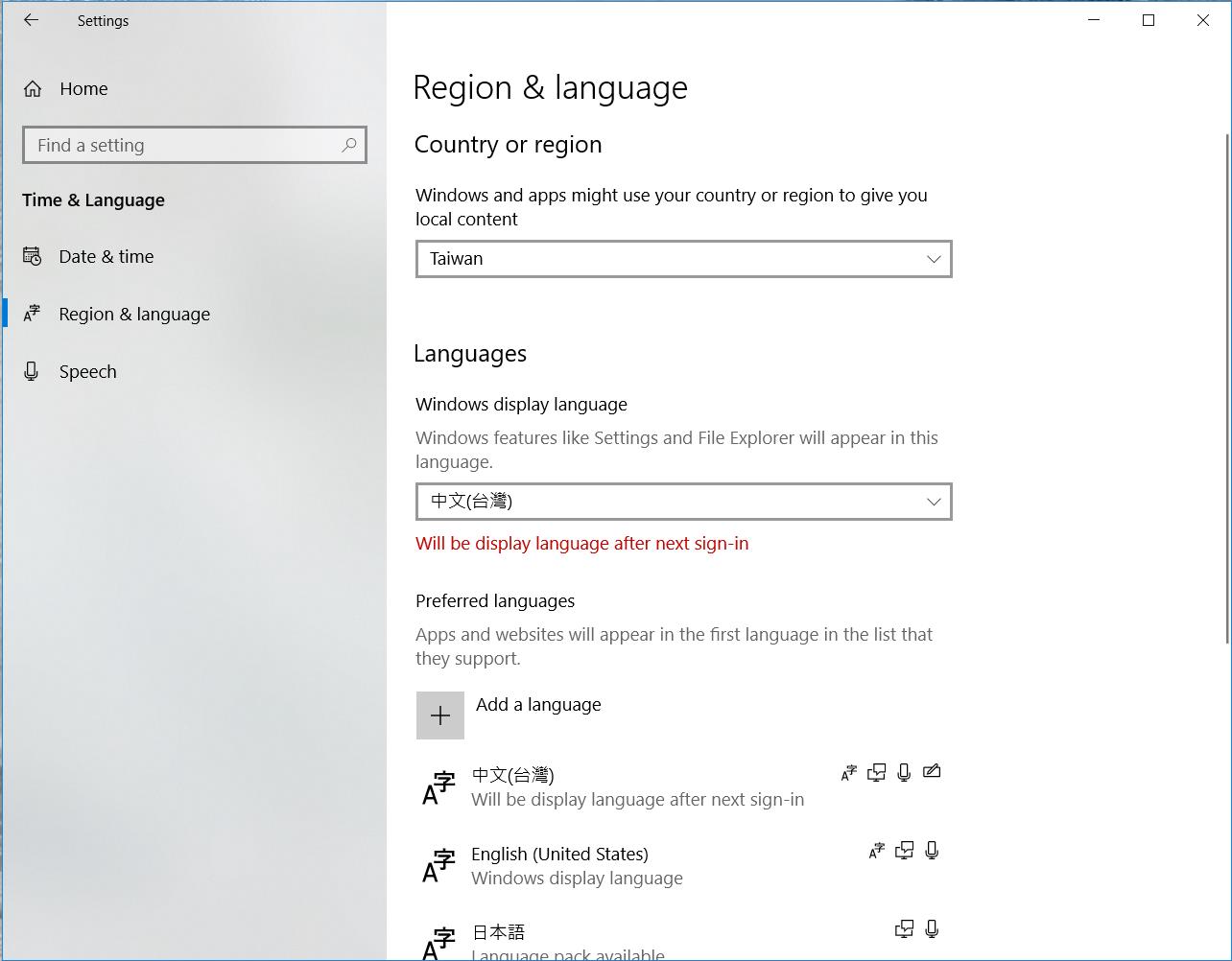
事後在網路上查 Windows 7 怎麼把顯示介面改成英文,結果是家用版的Windows 7 SP1 需要另外的語言套件,但是已經無法下載了,所以我的 Window 7 無法在不破解系統的狀況下改成英文介面。因此,上學期的 Windows 7 遇到操作上的問題,只能靠自己了。
I did some research on the internet about changing user interface to an English one. The result was for Windows 7 Home edition SP1, I needed a language pack to change the displayed language. This pack was unavailable anymore so that I could not change my display language without cracking my windows 7. Therefore, for the first semester, I could only figure out my IT issue when I got error messages.


這學期換成 Windows 10 當然不是只有這個原因,不過 Windows 10 的好處之一是顯示語言在設定當中就能更改,重開機就會生效,對於雙語使用者來說是個很方便的功能。
I changed to a Windows 10 this semester for several reasons, not only for the display language. But, an advantage of Windows 10 is that you can easily change the display language in Set-up and it works after next sign-in. This is convenient for bilingual users like me.


進到設定之後,選地區及語言:
在顯示語言的地方改成英文或其他想要的語言之後,下次重開機就會生效了。


In Set-up, choose Region & language:
 Select the display language as you wish and then restart your windows. It's done!

Thursday, 29 August 2019

Endless disconnection on Netgear AC800S (Optus 4G Wifi-Modem) Part 6 / 無止境的中斷連線 - 完

總之我決定取消這個網路方案,並且試著得到一部份從第三天開始因為機器有問題而導致網路很差的退費。


15. Aug 25
總之我打定主意要解約,並且因為要留下已經和Optus溝通過的書面證據,所以我用chat連絡客服。

第一個客服告訴我,如果要解約的話,我要付$200的解約費用。
我說這和你們之前的客服說的不一樣,你們六月一直想說服我解約的時候,說不用付任何的費用。
他說,你的方案是month-by-month,解約費是機器的費用。
我說,我沒有理由為這台有問題的機器付錢,而且你們在沒有經過我的同意的狀況下更改我原本綁約24個月、每個月攤還機器費用的方案,現在你的意思是不論我用了多久要解約,我的費用一直都會維持在$200了嗎。
他說,好吧,那他幫我轉去技術部門,如果他們同意機器有問題的話,他們可以幫我取消機器的費用。

轉技術部門的客服又花了兩個小時的時間要我重新設定我modem上的APN:

客:你有進到機器裡重新設定過嗎?
我:沒有,這台機器之前每兩到三天就要原廠重設一次,在機器裡做任何設定都是沒有意義的,原廠重設之後所有設定就消失了。
客:這台機器需要設定啊,這樣你的網路速度才會比較快,也不會斷線。
我:(這個說法在這四個月當中我倒是第一次聽到) 好吧。

接著大概花了20分鐘才進到設定機器的畫面,因為他搞錯ip了。我問他要的是不是http://Optus.AC800S 這是說明書上寫的連線方式,他說不是,他要的是在我的瀏覽器上開啟192.168.8.1,我說沒有反應耶,他很堅持要我換一個瀏覽器,最後我還因為他下載了chrome,還是一樣沒有反應,他才換成192.168.1.1,這才是連得進去的ip,而且結果和http://Optus.AC800S一模一樣。

在這裡他給了我一個官網APN list上也沒有的全新APN:
還在跟這台modem奮戰的人不妨可以試試看這個隱藏的APN設定有沒有辦法幫上忙。

我說但是這台機器太浪費時間了,重點是我在city也持續發生斷線的狀況,每發生一次我連絡客服就要花掉一到兩個小時的時間,而且從五月到現在也沒有真正解決過問題,你們一直想用black spot敷衍我,但是我遇到斷線的地方不是city就是離city很近的地方,這根本不能用black spot來解釋。

他說,看了你的資料,你已經申請過replacement但這個狀況還是發生,而且在基地台附近也還發生這樣的狀況,他會在記錄上註明,若是我把兩台機器都寄回去的話,他們會取消機器的費用。

我再次確認,現在的結論是,我把機器寄回去,你們就不會收取機器的費用。

他說,對,但因為現在已經超過解約部門的上班時間,所以請明天上班時間再聯絡我們,我在記錄上已經寫得很清楚了,明天的同仁就可以幫你辦好。


16. Aug 26 - 取消
再次用chat連絡客服,直接說我要取消,請看昨天的客服的記錄,這次轉接之後,取消部門的客服就開始處理了。

他先問我,如果我繼續使用的話,他可以給我$15的折扣。

我說,如果這個網路可以用的話,我很樂意繼續用,但這實在是太浪費時間,發生斷線的次數也太多了。

他說,好吧,那請問你要現在就取消,還是要未來的某一天取消。

我說,就現在取消吧。我有兩台modem要寄回去,我手邊現在有一個之前維修部門的袋子,但它放不進兩台機器。

他說,我了解了,會在安排寄送袋子過去,收到之後請幫我們幫寄送回來,收到之後會扣掉機器的費用。

我說,好,謝謝。

他說,下次申請我們的服務之前請先確認你所在的地區訊號怎麼樣。

我說,事實上我確認過了,你們的網站上寫 "great":


但是你們的客服一直鬼打牆Adelaide到處都是black spot。

他只好說:很抱歉一直讓你有這樣不好的體驗。

這次我在手機有收到申請回寄袋子和取消的兩個編號。這段時間以來,我發現沒有編號的案件基本上等於沒有成案,客服不論承諾什麼都是空話。


17. Aug 26 - 退款
這天晚上我查了My Optus Account裡,發現這個號碼還在,系統裡面資料也都還在。Optus的客服這段時間以來一直都有沒有處理的記錄,因此晚上我還是再用chat客服,這次我也要一起詢問退費的事宜,做為下一步往Telcommunication Industry Ombudsman申訴的準備。

我先詢問取消行動寬頻到底是不是在處理當中,客服確認過之後說是,取消需要幾個小時的時間,My Optus Account需要24小時才會反應,取消的程序完成之後,網路就會自動斷線不能使用,所以我會知道已經完成了。

我說那接下來我想確認,關於這個modem從第三天開始就持續斷線的狀況,請問我有機會得到你們的退費嗎?

第一位客服把我轉到技術部門去,因為他覺得是機器的問題,就很快地把我轉走了。

我說,現在討論機器的問題已經沒有有意義了,我已經取消了,我也要把機器寄回去了,我只想知道在這個從第三天開始斷線的狀況,我可以退費嗎,yes or no。

第二位客服說,顯然你被轉錯部門了,他再幫我轉給適當的部門。

第三位客服應該是專門處理退款的部門,我把我的訴求再說了一次:
1) 我拿到機器的第三天就開始出現問題。
2) 你們的網站上的廣告寫Adelaide訊號很好,而且地圖上基地台的位置都在附近。但是我發生斷線到要原廠重設的地點甚至是基地台所在的同一棟大樓。
3) 雖然容量有200Gb但這個modem說斷線就斷線,一旦modem出問題的時候,網路也等於是不能用。
4) 從五月一開始發生這樣的回報我就持續的回報,每一次都要1-2個小時的時間轉接來轉接去,客服人員不停地說謊,一下子要我到門市去、一下子說要寄新機器給我、一下子說系統重置過了沒問題了,但這段時間中斷線還是持續發生,這是在浪費我的時間。

最後他說,因為這段時間當中還是有部份流量的使用,所以他不能全額退款,但是他可以退50%給我。他算了之後說退一個月的費用給我,我說,我付了四個月的費用,為什麼退一個月呢。他重新算了一下,之後確認退兩個月的費用給我。

到這個步驟如果沒有拿到退款的話,也沒有關係,因為和Optus客服提出退款的要求只是為了要符合向Telcommunication Industry Ombudsman申訴的條件:已經和企業溝通過但對結果不滿意。Optus沒有email的聯絡方式,不能寄書面通知過去,為了證明已經和企業溝通過但對方不願意退款,只能用chat留下這樣的書面記錄;不要使用電話客服,因為不會有書面資料。最後對話結束的時候一定要確認收到對話記錄再把視窗關掉,有時候連這個系統也會出錯,對話記錄就憑空消失了。


18. Aug 29
從郵局把退貨用的袋子領回來,這天的傍晚,星期一客服說的 "幾個小時" 的取消流程終於完成了,行動寬頻的網路從傍晚開始中止。不知道從Aug 25 到Aug 29 這幾天的費用最後到底怎麼算。收到最後的帳單才會知道了。


19. 最後的結果更新在這裡


給直接end的人:
1. 連絡Optus客服的時候,自己記錄日期、詢問的事項以及回覆,若能記下客服人員的姓名和員工編號更好
2. Netgear AC800S 在澳洲出現黃色的disconnection 錯誤視窗的時候,重開機或重裝SIM卡無法解除這個斷線狀態,唯一恢復連線的方式是恢復原廠設定 (factory reset)。這個情況發生的頻率可以高達每1-2天發生2-3次。
3. 這是機器的問題,不是4G線路,也不是訊號死角。簡單說是拿到機王了。
4. Optus 的客服對應這個狀況沒有統一的SOP,到他們想到可能是機器的問題並且願意維修或換一台機器,通常需要幾個月,甚至到一年的時間。